RelationshipOS · New features

Hear every visit.See every answer.

Two exciting new features are now live on the RelationshipOS platform, bringing branch surveys and AI analytics to banks and credit unions. Surveys tells you how visitors feel after every appointment and lobby visit. Pulse brings your branch, staff and service performance into one clear view you can explore simply by asking.

Schedule a demo

New features, now available on the RelationshipOS platform.

RelationshipOS SurveysNew feature

Every visit,heard.

Understand how visitors really feel about their appointments and branch visits, and see where your team can follow up, improve experiences and build stronger relationships.
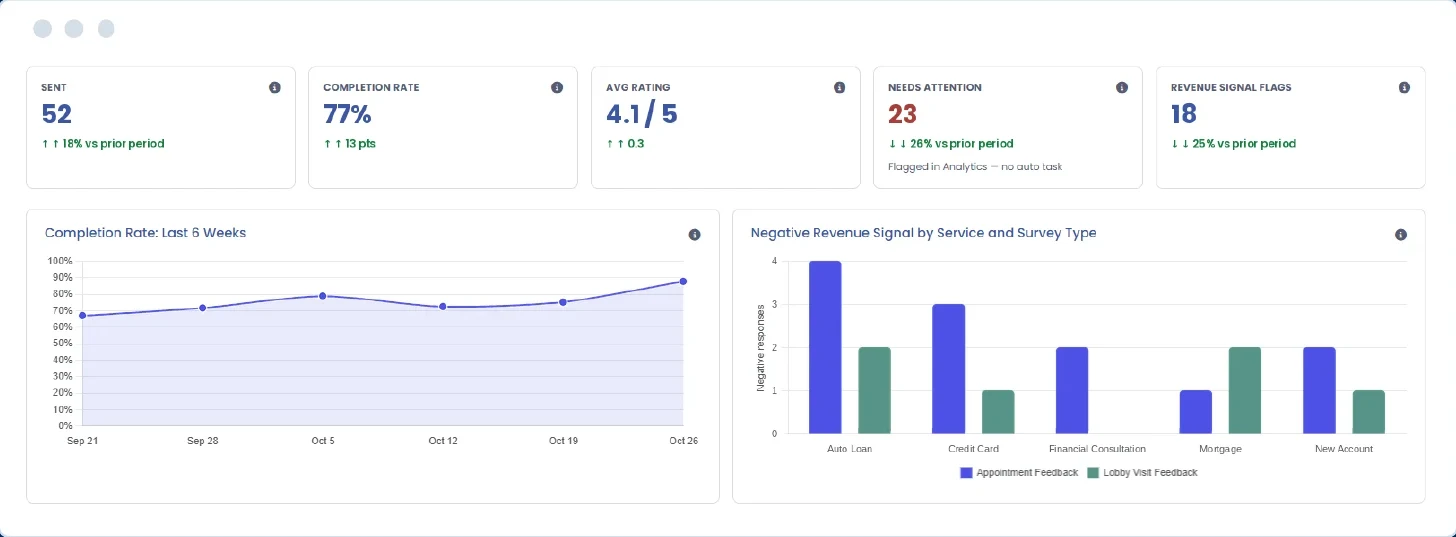
Surveys dashboard showing surveys sent, completion rate, average rating, responses needing attention and revenue signal flags
Feedback that flows automatically
Spot feedback that needs attention
See every branch clearly
The visitor experience

Listeneffortlessly.

Understand lobby and appointment experiences across every channel. Surveys automatically collects feedback from visitors following their interactions, helping your team uncover valuable insights without adding to your staff’s workload.
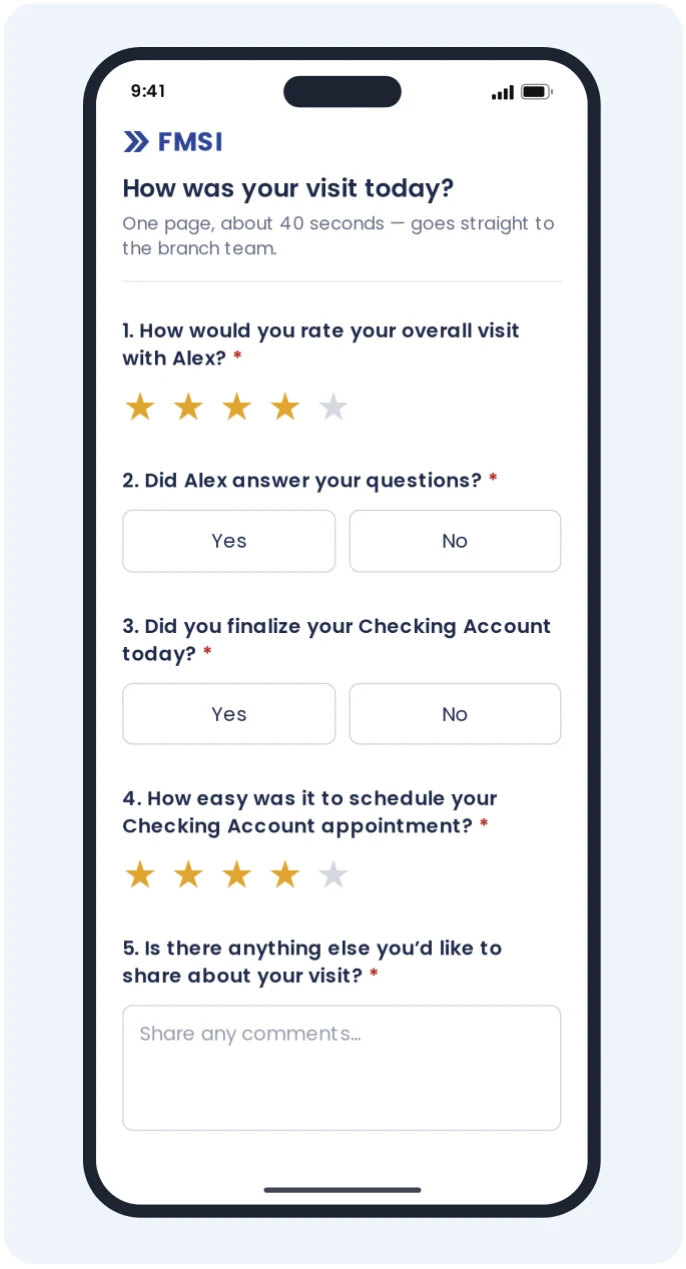
A five-question visit survey on a phone, branded with the institution’s name

Feedback that starts itself

Surveys go out automatically after completed appointments and lobby visits. No lists to pull, no campaigns to plan.

Right channel, right moment

Visitors hear from you by text or email, timed to their visit, with quiet hours that respect their time.

Track sentiment and Revenue Signals

Go beyond satisfaction ratings. Capture visitor feedback and identify potential missed revenue opportunities through Revenue Signal questions, all within the same survey.

Your brand, their voice

Branded with your institution’s name and logo, each survey offers visitors a personalized experience that’s quick and easy to complete.

Appointment Feedback · Lobby Visit FeedbackAvailable based on your licensed RelationshipOS modules.
Act on what matters

Turn feedback intoopportunities.

Not every response needs the same attention. Surveys brings forward the feedback your team shouldn’t miss, so leaders know where a follow-up conversation may matter most.
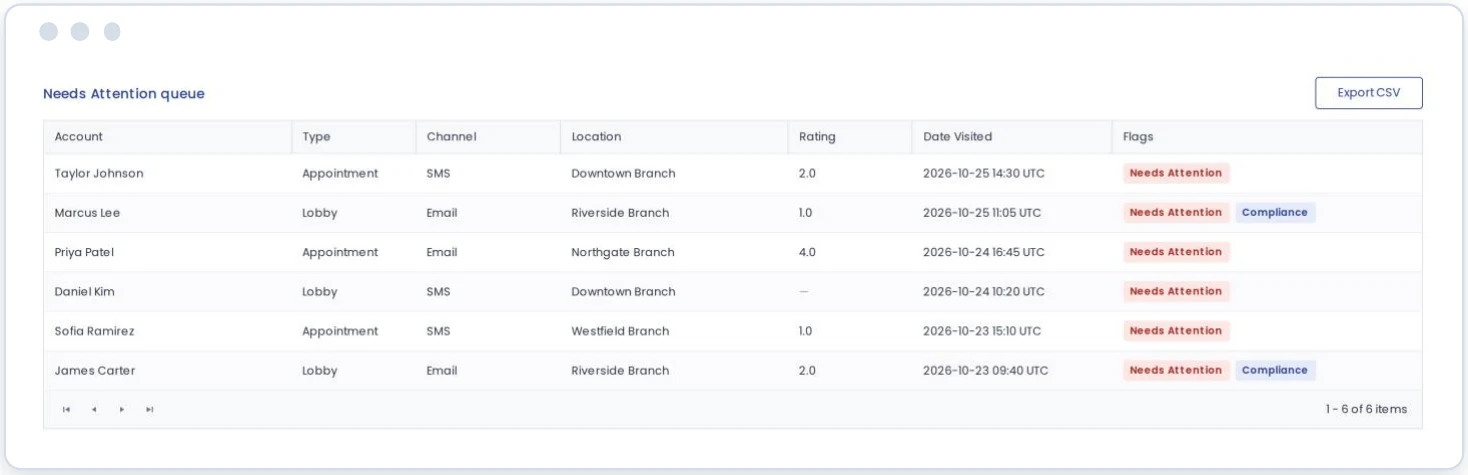
Needs Attention queue listing flagged responses by account, visit type, channel, branch and rating

Spot important feedback before it gets overlooked

Responses that fall below the rating threshold you set are flagged automatically and gathered in one place for review.

Uncover potential missed opportunities

Mark a key question as a Revenue Signal, such as “Did you finalize your auto loan today?” Track both “Yes” and “No” responses to see which opportunities closed and where a follow-up conversation may be needed.

Keep sensitive comments in view

Written comments are checked against a compliance keyword list your institution manages, surfacing potentially sensitive feedback for review.

Each response can be viewed with its full visit context, including visitor, branch, staff member, service and answers, so your team knows exactly where to start.

Insight for leaders

See thebigger picture.

Surveys turns every response into a clear view of how the people you serve feel, from individual visits to your entire branch network, so your teams can deliver a consistently great experience however they choose to visit.
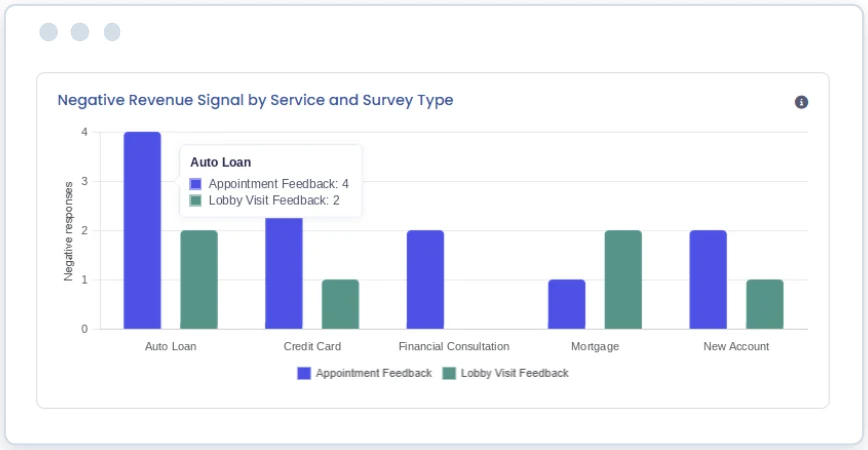
Chart comparing negative Revenue Signal responses by service for appointment and lobby visit feedback

Follow the trends

Track completion rate, average rating and flagged feedback over time.

Where opportunities slip

Compare negative Revenue Signals by service, for appointments and lobby visits.

Focus on what you lead

Filter by branch, survey type and date. Leaders see the locations they oversee.

Completion trendsAverage ratingNeeds AttentionRevenue Signal flagsExport-ready data

See Surveys in action.

Schedule a personalized demo and see how Surveys helps your teams hear, understand and act on every visit.

Surveys is a new feature available now on the RelationshipOS platform. Reach out to explore it or discuss pricing for your institution.

RelationshipOS PulseNew feature

Your operations,in focus.

RelationshipOS Pulse brings branch, staff and service performance into one clear view, and lets you explore it simply by asking.

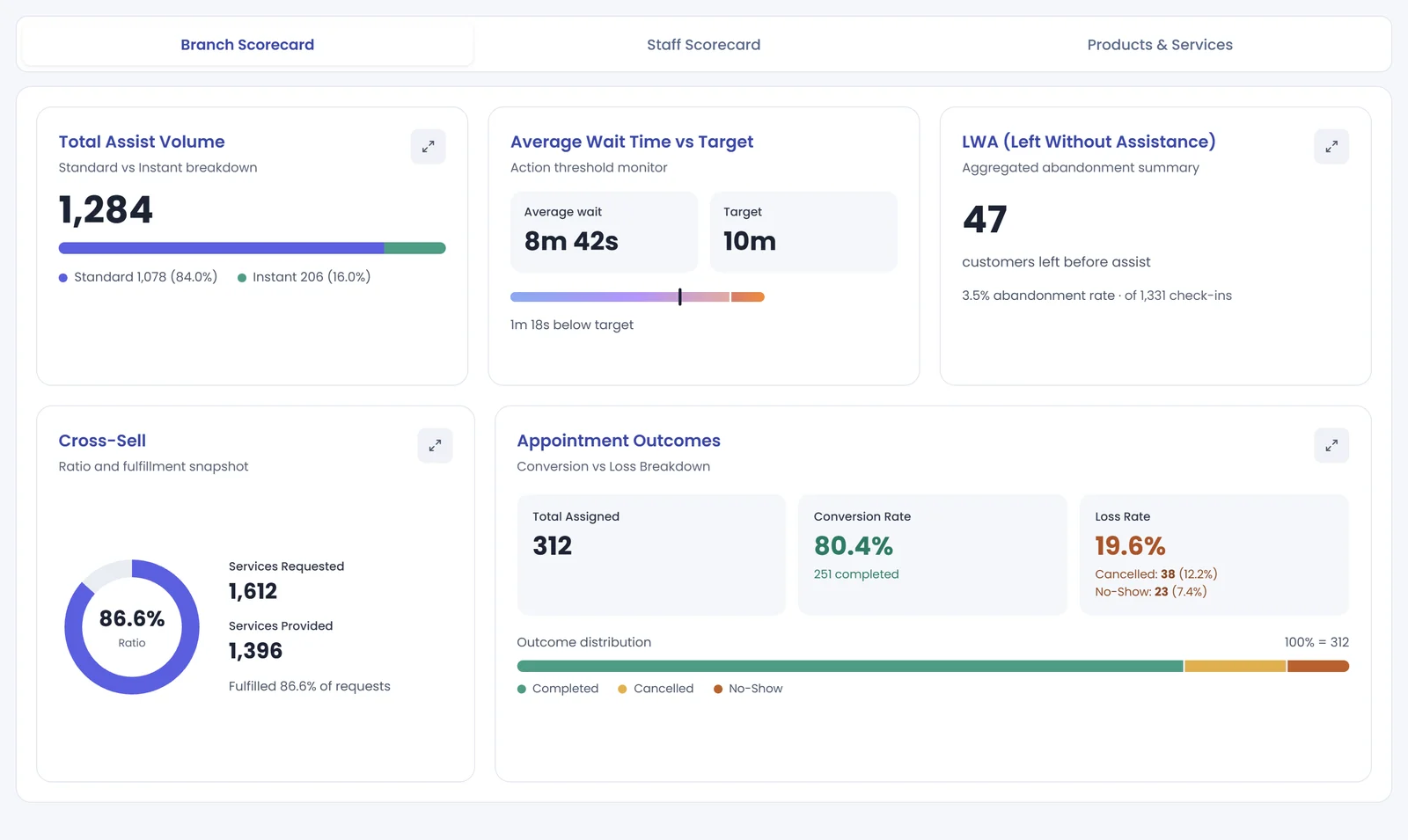
Pulse Branch Scorecard showing assist volume, wait time against target, visitors who left without assistance, cross-sell and appointment outcomes
See performance at a glance
Ask questions in plain language
Keep key insights close
Dashboard

The full picture,at a glance.

Dashboard brings your branches, staff, and products and services together in one view, so leaders can quickly see how operations are performing and where to look closer.

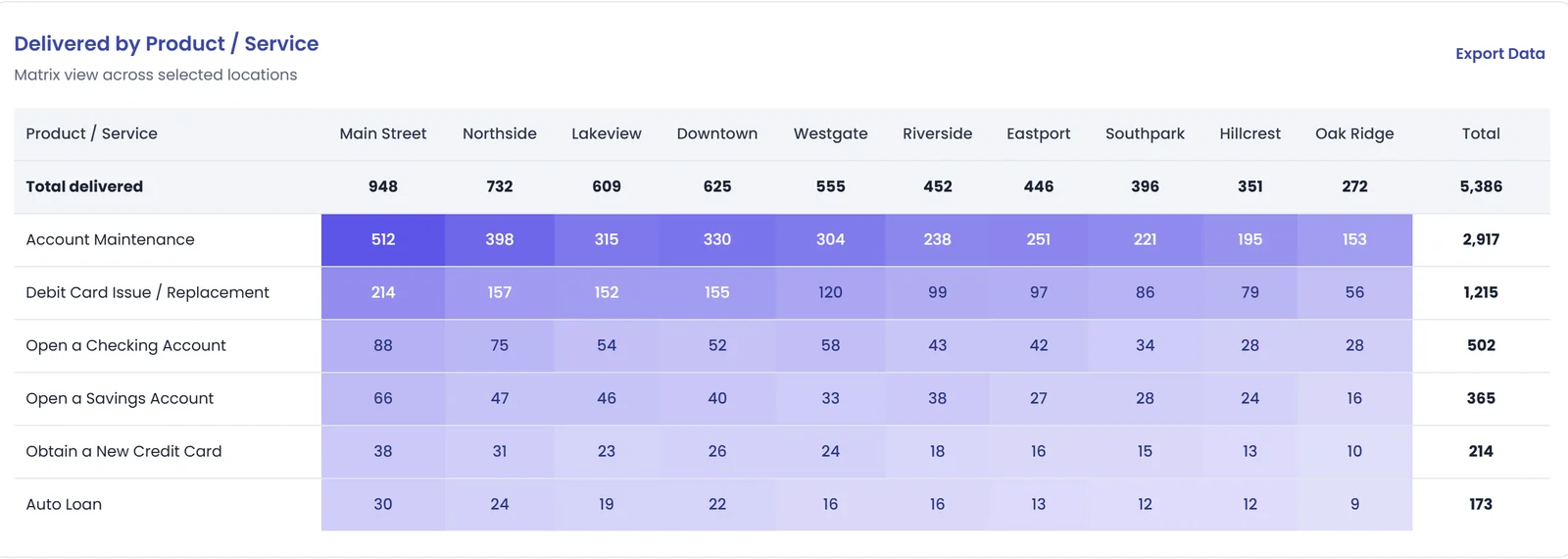
Products and services delivered by branch, shown as a heat map in the Pulse Dashboard
Branch scorecard

See how every location is performing

Wait time against target, visitors who left without assistance, appointment outcomes, cross-sell and peak hours.

Staff scorecard

Understand your team’s activity

Assists and items handled, and who is delivering the most, filtered by group or individual.

Products & services

Know which products and services are moving

What’s being delivered, where it’s delivered, and how long those assists take.

Key indicators,always on top

Total activity · Appointments completed · No-shows · Walk-ins completed · Left without assist · Average wait · Average assist time · Cross-sell

Ask Pulse

Keep a Pulseon your operations.

Pulse lets you explore your operations by asking questions in plain language, and answers with a clear summary and the visuals to back it up. No report building required.

Try asking
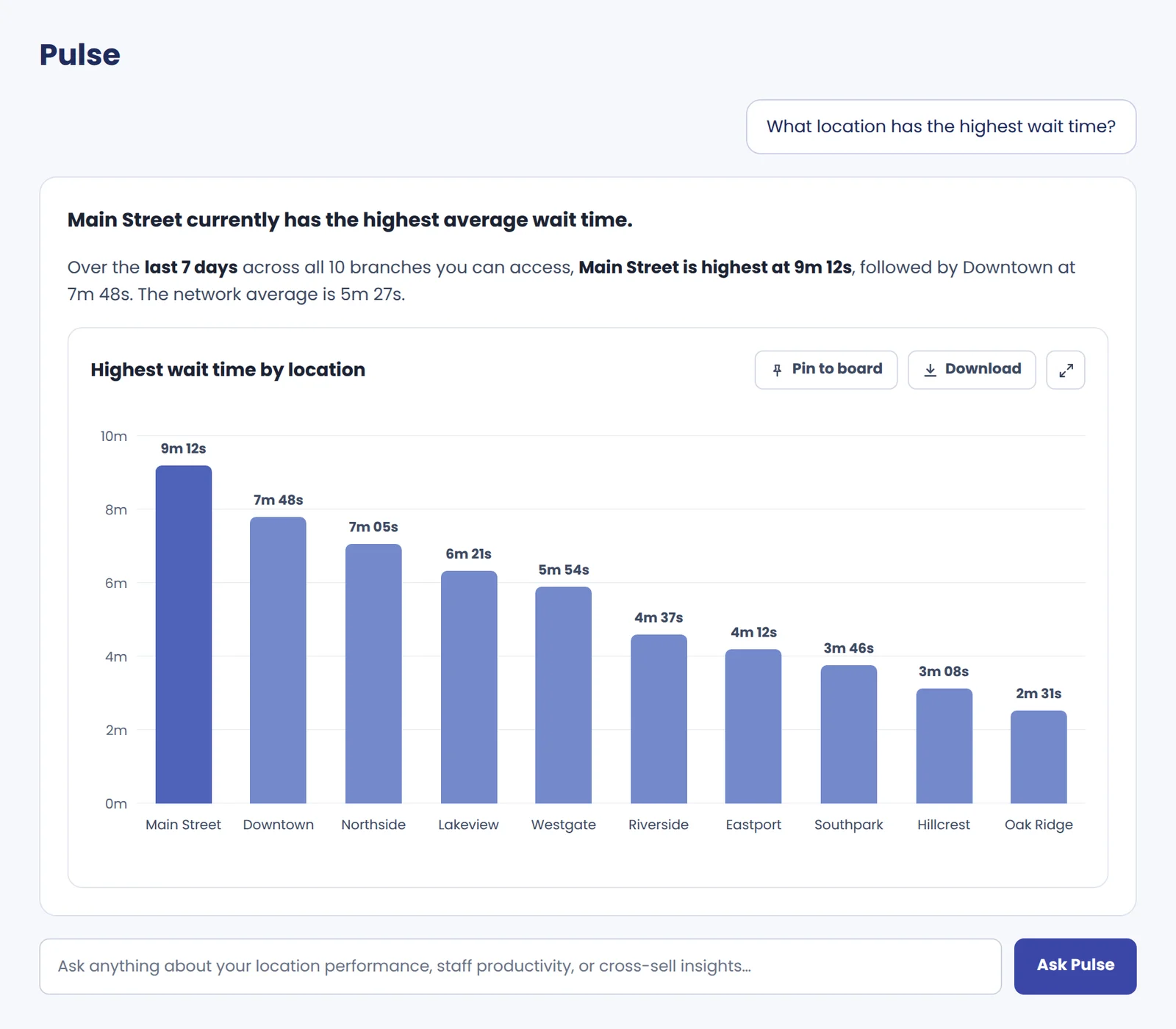
“What location has the highest wait time?”
“When are peak lobby hours?”
“How is cross-sell performance?”
“Which locations have the highest appointment volume and year-over-year trend?”
Pulse answering “What location has the highest wait time?” with a written summary and a bar chart by location
Answers your way
Written summaries
Charts & comparisons
KPI cards
Tables

Keep the conversation going

Ask a follow-up in the same conversation to change the time period or reorder the results.

Take answers into your next meeting

Download charts as an image or PowerPoint slide, export tables to CSV, or pin charts, KPIs and tables to a board.

Pulse explores your RelationshipOS lobby, appointment, staff, and product and service data for the branches you oversee.

My Boards

Your insights,your way.

My Boards keeps the analytics you rely on most in one place, organized your way.

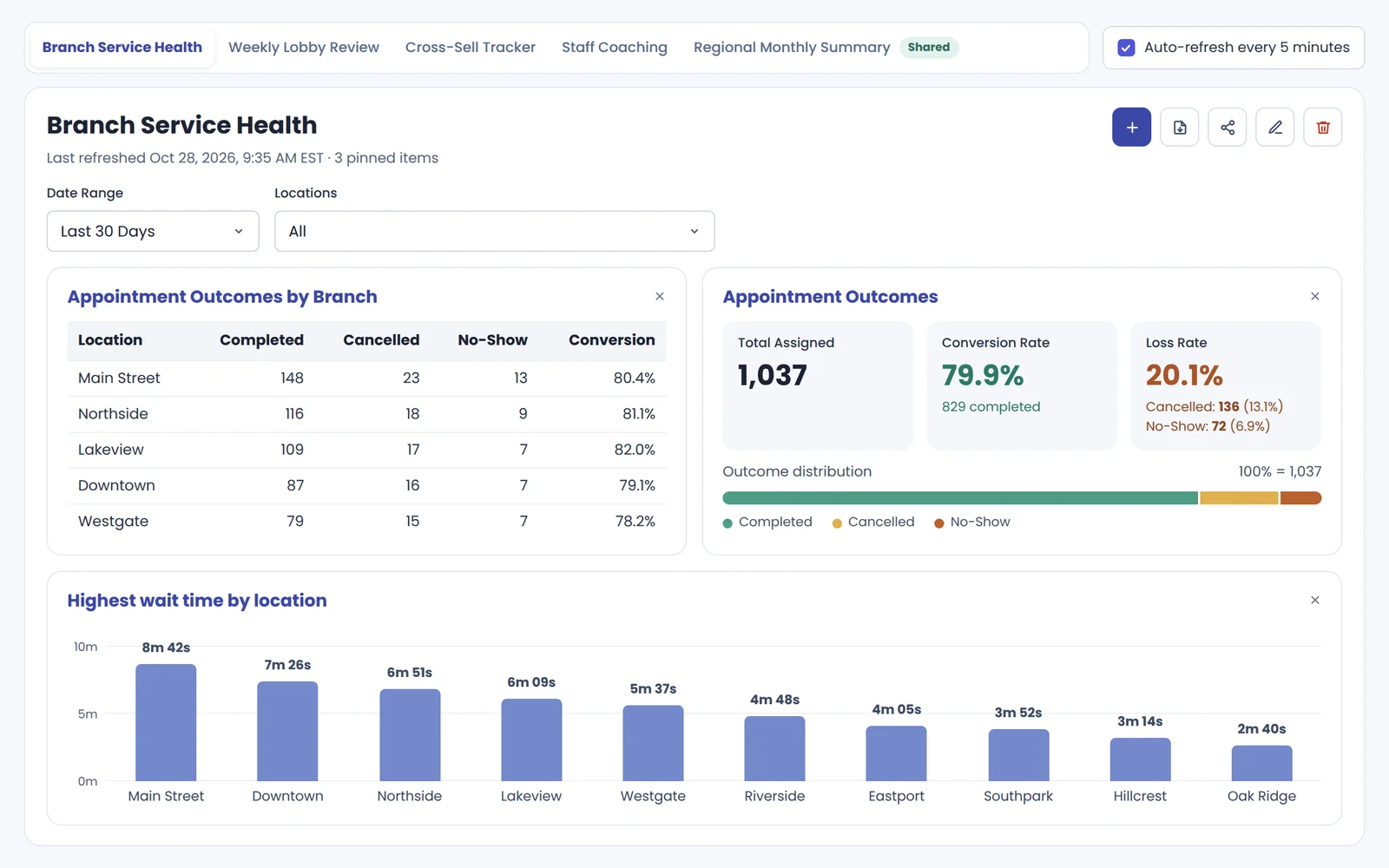
My Boards showing a Branch Service Health board with pinned widgets, filters and automatic refresh

All in one place

Pin Pulse answers and add scorecard widgets to boards you name and arrange.

Revisit with updated data

Return to your boards anytime, and turn on automatic refresh when you need it.

Share and export

Share boards with colleagues and export them to PDF for meetings.

What’s next

We’re continuing to expand Pulse. Coming soon to Dashboard:
Traffic & Wait TimeComing soon
Cross-Sell ViewComing soon
Audit LogComing soon

See what Pulsecan tell you.

Interested in exploring Pulse? Schedule a demo to learn more now.

Get started

See what’s newon RelationshipOS.

Surveys and Pulse are new features available now on the RelationshipOS platform. Book a demo to see them in action, ask about joining the Pulse beta, or talk through pricing for your institution.

Get to know FMSI.

If you’d like to walk through the platform with our team, or simply ask the questions you have before any sales conversation, we’re happy to help.